


Screen Time - Parental Control
3.09.35K Reviews
App Specs
- Version
- 3.11.71
- Updated On
- License
- Free
- Downloads
- 1,000,000+
- Developer
- Parental Control App by Screen Time Labs
- Categories
- Parenting
- Platform
- Android, iOS
Screenshots

 Analysis by AppCompare
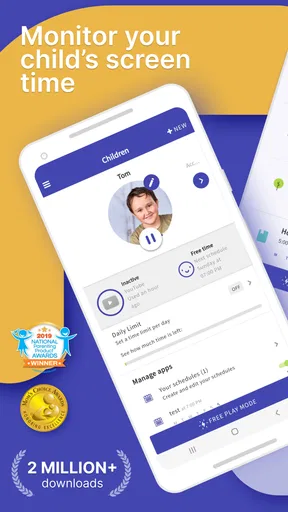
Ever caught yourself wondering how much time your kids are actually spending on their devices? Well, that's where Screen Time - Parental Control comes in handy. This nifty app is all about helping parents keep an eye on their kids’ digital habits without having to hover over their shoulders constantly.
Its most useful idea is simple: make screen limits visible and consistent, so a parent does not have to negotiate every extra minute from scratch. That can change the tone at home. Instead of being the person who suddenly takes a phone away, I can point to a boundary we agreed on in advance and talk about whether it still fits the day.
Screen Time is a free parenting app from Parental Control App by Screen Time Labs. It has a 3.1 average from around 49,000 ratings, so reactions are mixed rather than universally glowing. I’d treat that as a reason to test the family’s actual routine with it, not as proof that it will or won’t work for your child. It is rated for Everyone and has more than a million installs, while optional in-app purchases range from about $1.52 to $49.99 per item.
Getting Started with Screen Time
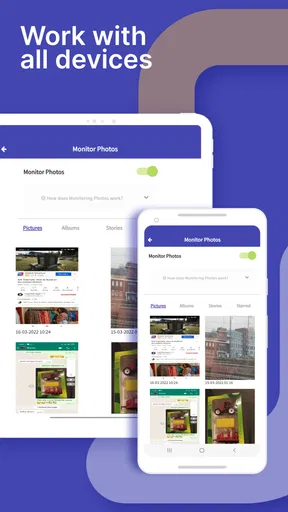
Setting up Screen Time - Parental Control was a breeze. I downloaded the app, signed up, and was prompted to connect it to the kids' devices. It was pretty straightforward, and within minutes, I was ready to explore all the cool features. The app works seamlessly on both Android and iOS, so no worries if your household is a mix of different devices.
That cross-platform angle is especially useful when parents and children do not all use the same kind of phone. Rather than choosing a system that only makes sense for one device family, you can consider one parental-control approach across a mixed household. I would still set it up together with the child where possible: explaining what is being limited and why makes the rules feel less like a surprise intervention.
Features That Stand Out
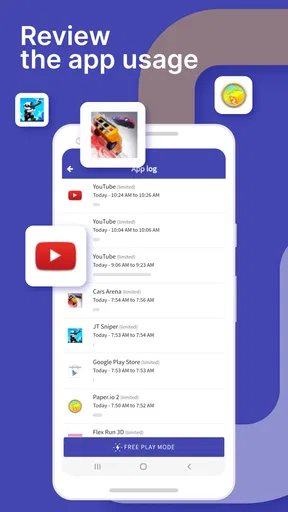
One of the things I love about this app is the daily summary feature. It gives you a snapshot of how much time your little ones are spending on different apps. You can see exactly which apps are eating up their time and decide if it's time to set some boundaries.
A summary is most helpful when you use it to start a specific conversation, not to make a general accusation about “too much screen time.” For example, if a child says they only played a little after school, the app’s overview can help you compare that impression with the pattern across the day. I’d look for repeated habits over several days before changing a rule; one unusually long afternoon may have a perfectly reasonable explanation.
Worth Reading Before You Choose

Flipboard Shows What News Apps Must Do Beyond the Feed

Switching to Android Auto Means Rethinking Your Driving Routine

Google Calendar Makes a Crowded Week Easier to Manage

Ludo King Makes the Most of the Minutes Between Plans

Baby Panda World Brings Quick Play to Modern Phones, but Its Game Library Feels Busy

ESPN’s Live Game View Makes Following Close Games Easier
This is also where Screen Time differs from a basic device timer. A built-in setting can be enough if all you need is a limit on your own child’s phone, but a parent-facing view of app use can make it easier to understand what the limit should address. The trade-off is that a record of usage does not explain the context. Time in an app might mean homework, messaging a friend, or entertainment, so the numbers are a prompt for judgement rather than a verdict.
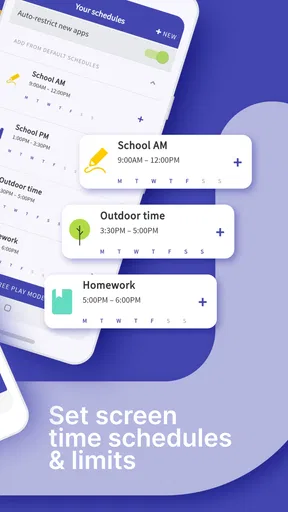
Another standout feature is the ability to set time limits. Let’s say you want to limit gaming to just an hour a day; you can easily set that up. Once they hit the limit, the app gives them a gentle nudge to take a break. It’s like having a digital nanny who’s really good at time management.
For smoother results, I’d agree on the boundary before the first limit is reached. A child who knows the plan can prepare to finish a game or save their work, while a limit that appears without warning is more likely to feel arbitrary. It is also worth deciding what counts as an exception before a busy day begins, such as when a school task takes longer than expected. The app can help enforce a rule, but parents still need to make the rule fair.
Customizing Screen Time
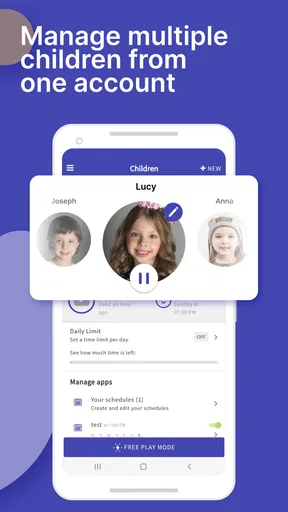
Customization is key, and this app lets you do just that. You can adjust settings based on each child's age and needs. Have a teenager who needs more screen time for homework? No problem. You can differentiate between educational apps and leisure ones, ensuring they’re getting the most out of their screen time.
I’d approach that flexibility carefully with older children. Separating school-related use from leisure can prevent a blanket rule from getting in the way of a real assignment, but “educational” does not always mean every minute should be unlimited. A practical household agreement might be to allow the time needed for a task, then check in if the same exception becomes the everyday pattern. That keeps flexibility from quietly turning into a loophole.
Plus, there’s a reward system where kids can earn extra screen time by completing chores or achieving good grades. It’s a win-win situation; they get more screen time, and you get a clean room. Genius, right?
Rewards work best when they are modest and clearly connected to an agreed task. I would avoid making every ordinary responsibility a transaction; otherwise, children may start treating basic chores as optional unless a screen-time bonus is attached. A useful middle ground is to reserve extra minutes for occasional goals, while keeping the regular daily limit predictable. That way, the reward supports a routine instead of replacing it.
Staying Connected
Another cool feature is the daily task feature. You can set tasks for your kids, and once they complete them, they can earn extra screen time. It’s a fantastic way to encourage responsibility and reward good behavior.
A small workflow tip: keep tasks concrete and easy to confirm. “Put your school things away” is clearer than “be more responsible,” and it reduces the chance of turning completion into an argument. For families with several children, it is also sensible to tailor tasks and limits to each child rather than assume the same schedule suits everyone. The point is not to turn the app into a household scoreboard, but to make expectations easier to remember.
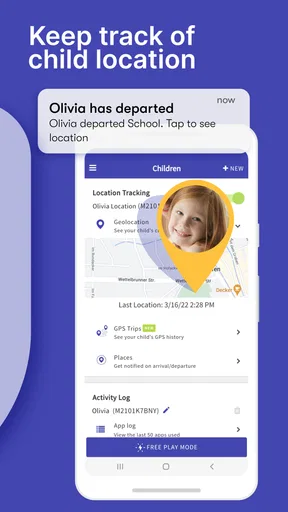
The app also offers real-time location tracking, so you can keep tabs on where your kids are. It provides peace of mind, especially if they’re out with friends. You’ll know if they’re at soccer practice or just hanging out at the mall.
Location is useful for a particular kind of reassurance, but I would not make it a substitute for checking in directly. Before relying on it for a pickup or an after-school plan, talk with your child about when location sharing is being used and what you expect them to do if plans change. The broader Screen Time experience combines oversight with limits; families who mainly need occasional location sharing may prefer a simpler location-focused option, while families already working on device routines may value having both kinds of support in one parenting app.
A Few Considerations
Now, every app has its quirks. Occasionally, I noticed some lag in updating the time spent on certain apps. It wasn’t a deal-breaker, but it’s something to be aware of. Also, the location tracking feature is fantastic, but it can drain the battery a bit faster on some devices. Just a heads up!
That reporting delay matters most if you expect the dashboard to function as a live control panel. I would use the daily summary to spot patterns and have calmer follow-up conversations, rather than checking it minute by minute or confronting a child over a small apparent mismatch. For location, battery use is a practical reason to treat tracking as a tool for agreed situations, not something to rely on constantly without considering the child’s device needs.
There is another trade-off that no setting can solve: close monitoring can protect younger children, but too much oversight may undermine trust with a teenager. I’d explain the purpose, invite questions, and revisit the rules as a child becomes more independent. If your main goal is a private, non-supervised relationship with a teen’s device, or you need only a simple timer, this may be more parental oversight than you want. A built-in screen-time setting may be a better fit for a family seeking only basic limits.
One last thing to consider is that while the basic features are free, some advanced features require a subscription. However, given the peace of mind and control it offers, many parents might find it worth the investment.
Since the app is free to start and offers optional purchases, I’d begin by identifying one real problem—such as drawn-out gaming sessions or uncertainty about app use—then see whether the available tools address it before spending money. The current version is 3.11.71, and it supports devices running version 7.0 or later. The app has been available since July 30, 2013, but what matters more for a new user is whether its present controls fit the family’s needs and whether the child can understand the arrangement.
Who Gets the Most from It
I think Screen Time is strongest for parents who want more than a single daily timer: a view of app habits, a way to set limits, task-based rewards, and location awareness can support a routine that otherwise depends on repeated reminders. It suits younger children especially well when adults are ready to explain boundaries and apply them consistently. It can also help in a mixed-device home where a parent wants to manage children’s digital routines across Android and iOS.
It is less compelling if your household already has a calm, agreed screen-time routine and the phone’s built-in controls do everything you need. It may also frustrate families who expect every usage figure to update instantly or want location tracking without any battery trade-off. In those cases, a simple device-level timer or a location-only tool may be easier and less intrusive. The best choice depends on whether you need ongoing guidance around app habits, not simply whether you can install a parental-control app.
Wrapping It Up
Overall, Screen Time - Parental Control is a brilliant app for modern-day parenting. It helps you manage your kids’ digital lives while teaching them about responsible screen time usage. With its easy setup, intuitive interface, and comprehensive features, it’s a must-have tool for any parent navigating the digital age.
My recommendation is to treat it as a shared routine-builder, rather than a way to win arguments by pointing at a dashboard. Start with one limit, explain the reason, and adjust it after seeing how it affects homework, rest, and family plans. If the rules are transparent, the app can reduce repetitive negotiations; if they are imposed without discussion, even a well-designed limit can become another source of conflict.
So, if you’re looking to strike the right balance between screen time and family time, give Screen Time - Parental Control a go. You might just find yourself with more family game nights and less screen-induced arguments. Sounds like a win to me!
Pros
- Easy to set up and navigate for parents.
- Customizable screen time limits for kids.
- Real-time location tracking feature.
- App usage reports provide insights.
- Remote device locking capability.
Cons
- Some features require a premium account.
- Children may find ways to bypass controls.
- Can drain battery life quickly.
- Limited support for non-smart devices.
- Occasional delays in syncing data.
FAQs for Screen Time - Parental Control
What is Screen Time - Parental Control and what are its main features?
Screen Time - Parental Control is an app designed to help parents manage their children's device usage. Key features include setting daily screen time limits, blocking specific apps, scheduling downtime, monitoring activity, and tracking location. These tools enable parents to ensure a balanced digital lifestyle for their children and encourage healthy device habits.
Is Screen Time - Parental Control easy to set up and use?
Yes, Screen Time - Parental Control is straightforward to set up. After downloading the app, parents need to create an account, install the app on their child’s device, and link it to their account. The user-friendly interface allows for easy navigation, making it simple to adjust settings and monitor usage efficiently.
Can Screen Time - Parental Control be bypassed by children?
While Screen Time - Parental Control is robust, tech-savvy children might find ways to bypass it. However, the app offers various security measures, such as requiring a password for changes and notifications for suspicious activity. Regular updates also help improve security, but parental guidance and open communication are crucial for effectiveness.
Does Screen Time - Parental Control affect device performance?
Screen Time - Parental Control is designed to run smoothly without significantly affecting device performance. It operates in the background, using minimal resources to ensure that it doesn't slow down the device. However, the impact may vary slightly depending on the device model and operating system version.
Is there a cost associated with Screen Time - Parental Control?
Screen Time - Parental Control offers both free and premium versions. The free version includes basic features like activity monitoring and daily time limits, while the premium version offers advanced features such as app blocking and location tracking. Subscription plans are available, providing flexibility to choose the best option for your needs.


